Category: Niche Site Case Study

  • NSD Episode 4: Niche Site Content Creation

    NSD Episode 4: Niche Site Content Creation

    “No, we ain’t got an office yet. But we got big plans like an architect.” Lyrics from the Song WutUWanKno (Masta Ace ft. Edo G, A Long Hot Summer Album)
    niche-site-content-creationWelcome to another episode of my niche site case study.

    If you have been following my blog, you know that I have already chosen my niche and set up my website with a cool theme. You can catch my last post on how I set up my niche site WordPress for SEO here.

    Setting up the site correctly for SEO is important to make it easy for Google to find my content. While I will initially focus in driving traffic from different sources, ultimately I will want to let the site go on a roll and get organic traffic from Google.

    Apart from this, setting the site correctly will help to avoid any issues that WordPress has with indexing duplicate content.

    You can use a couple of plugins to easily make WordPress ignore any duplicate content on your site. I have outlined how to prevent duplicate content in your WordPress site in this video.

    Now, back to the topic at hand. I have finished all the basics of setting up the the website, except for one thing: creating content.

    Niche Site Content Creation

    One mistake that I find many people make when creating niche sites is putting up mediocre content. By mediocre content, I mean using spunned content or content that does not make sense.

    I believe content is the most important part of building a niche site. Heck, you can even sell to an audience if you have content alone (even without a website). But that is a post for another day. For now, let’s concentrate on content development.

    Content does not simply refer to the articles you will post on the site. Rather, it includes things like articles, images, videos, infographics, eBooks, and so on. All of these are what we collectively refer to as content.

    The content you create should achieve one or more of the following: educate, entertain and inspire.

    If visitors stop on your niche site but cannot get any value from the content, making sales will be difficult.

    Which Type of Contents Should You Create?

    The audience you are targeting should help you determine the types of content to  create. For most niches, creating informative articles will work. In fact, this is the primary type of content used 90 percent of the time.

    For my niche site, I am selling some products. Based on this information, here are the types of content I’ve chosen to go with and why:

    a) Articles – These will be posted on the blog and will also be used for blogger outreach (e.g. guest posting and syndication) and SEO purposes.

    b) Videos – I plan to create videos demonstrating how the product I am selling is used.  Videos can be helpful if you are selling a technical product that your target audience may want to know how to use.

    c) Ebook – This eBook is primarily for the purposes of building an email list from visitors on the site and from other third party sites.

    d) Infographics – These will mostly be used for link baiting and SEO outreach.

    These are the primary types of contents I will be creating for my niche site. Let’s look more into the contents.

    Niche Site Articles/Blog Posts

    keyword-organic-searchWhether you prefer calling them articles or blog posts, we are referring to the content that visitors read on the website.

    For my niche site, I will be relying heaving on search engines to get traffic to the website. Therefore, creating content that is optimized for the various keywords I am targeting is important.

    I use Google Keyword Planner, Google Keyword Suggest and Long Tail Pro to come up with keywords to target in the content. Every article primarily targets one primary keyword and includes a number of secondary long tail keywords.

    Here’s a description of the main and secondary keywords I target.

    Main Keyword. This keyword is what the whole theme of the article is about. I use the keyword once in the article title, once in the H1 (subtitle) title and once in the body.

    Now, this rule is not written on stone. Sometimes, I find myself using the keyword more than the number I have mentioned. However, I strive not to make the word sound unnatural. Generally, I don’t want to stuff the keyword everywhere in the article.

    Secondary Keywords. For an article, I may choose 3-4 secondary keywords to support the main keyword. These keywords are usually longer (more than 4 words) and have significantly fewer searches, sometimes less than 100, in Google.

    I target the long tail keywords because of three reasons:

    1. LSI relevancy. When Google bots read my website content and find the main keyword in the title, I want them to understand the page is specifically about that keyword I am targeting. I do this by using relevant supporting (secondary) keywords.

    2. Targeted traffic. Long tail keywords may not have many searches than the shorter keywords. However, the keywords usually get targeted searches.

    3. Cumulative traffic. Targeting long tail keywords can boost traffic to your niche site. For one, the keywords are easy to rank for since not many people are targeting them. Next, when you add the number of searches of the keywords, they can be nearly the same or higher than that  of short tail keywords.

    The content of the articles is bent on being informative rather than entertaining or inspiring. This is because the niche I am targeting is mostly looking for a solution to a problem they are have.

    Niche Site Video Content

    Video content is also part of the content strategy for my niche site. I haven’t created videos yet but I have a couple of ideas at the back of my head:

    1. Hire a model or use Fiverr to get a video made on the product. The video will be short, less than two minutes, with a call to action to my website. I will upload the video on my niche site as well as video sharing sites like YouTube.

    2. I can also make PowerPoint of Flash slides and convert them to video. These will mostly contain snippets on features and benefits of the products. The videos can be distributed on video sharing sites to build backlinks and drive traffic back to my site.

    The video(s) will basically be reviewing the different products on the site. Ideally, the model will be holding the product and instructing the visitors how to use it.

    The essence of creating video content is to improve the likelihood of visitors buying on my site. People are aware of affiliate marketers and the last thing I want to seem is an affiliate simply publishing information for the sake of gaining a sale.

    Of course you can still be successful without having video reviews on your website. Sometimes, you may not even need a video review. However, videos improve visitors’ trust and are likely to improve sales.

    Ebook

    For the eBook, I have two options; write it by myself (I’m a great writer) or outsource the content creation. I am yet to come up with the topic orcreate-an-ebook content outline of the eBook.

    Writing the book on my own is advantageous because I will be able to guide the reader in the direction I want.

    I will primarily use the eBook to gather email subscribers on my list at the website. This email list can be a great resource to tap on, especially if I would like to take things further in future and transition the website from a niche to an authority site.

    However, writing a book is not easy. First, there is the issue of knowledge of the topic. I have to admit I am not an expert on the subject matter of the products I am selling. I can however research online and come up with something good.

    Another option would be to hire a writer to help me create the book. I have previously hired writers from both Freelancer.com and iWriter.com and I have not been disappointed. The best thing with outsourcing the ebook creation is that I can get high quality content at possibly a lower rate.

    Infographics

    The main reason why I opted to use infographics is to get high quality niche links from relevant websites. The craze for infographic link building may have died but if used right, infographics can get you coveted links that your competitors may not get easily.

    For infographics, I will mostly be creating them using Photoshop. However, you can easily create your own infographic using Visual.ly or get someone to create one for you for 5 bucks at Fiverr.

    Creating infographics is easy when you already have the content you want presented visually. I will simply be getting statistics related to my audience online and using some points from my articles to create infographics.

    Infographics are also good for building backlinks.

    So, there we go. The above are the types of content I will be creating for my niche site.

    Do you have any questions or comments? Let me know.

    [mailerlite_form form_id=2]
  • NSD Episode 3: Setting Up My Niche Website

    NSD Episode 3: Setting Up My Niche Website

    niche-site-wordpress-seoHey guys!

    It’s been a few months since I last posted an update on my niche website. The truth is a lot has been going on behind the scenes. I have covered a lot of ground and I’ve actually finished setting up the website.

    This post is therefore coming late but for the sake of chronology, and helping anyone who may be following the study, I thought it would be good to show how I’ve set up my niche site.

    From my last NSD2 update, you already know I am using WordPress for my niche site. There are a number of reasons why I prefer WordPress to Joomla, other content management systems (CMSs) and perhaps creating static sites.

    Here are the main reasons why I prefer WordPress, and why I also think it’s better than other options:

    i)   WordPress is optimized for SEO. It is easy to set up any WordPress for the best SEO performance.

    ii)  WordPress is easy to use. The CMS is more visual in nature. Creating and editing posts is easy.

    iii)  There are a wide range of plugins that can help me in driving traffic and generating leads on WordPress.

    These are the main reasons why I love WordPress.

    For a niche site, updating content can be crucial to your SEO. If you have a static website, you would need to download the page you want to edit, do the edits and upload the page again. Making design changes is also a big nightmare with static sites.

    On the flipside, making edits in WordPress is a breeze. You can make edits and see them in real time.

    Now, I believe everyone reading this is familiar with WordPress. If you are new to WordPress or are looking to switch from a static HTML site to WordPress, check my 5-minute WordPress installation guide. There, you will find solid information on how to get started with your WordPress site.

    Now, back to the task at hand; setting up my niche site using WordPress.

    Ultimate Guide to Setting Up a Niche Site Using WordPress

    The WordPress setup that I follow is meant to make the website take advantage of SEO and be in line with Google’s best practices. Below are the things I did, in no particular order.

    I will use screenshots of my primary domain name to show what I did. This will help you follow along in case you may not know what I’m talking about. Moreover, some people understand better when they see images (Did I hear a lady say men are visual creatures?)

    Okay, let’s get started.

    Site Design Matters

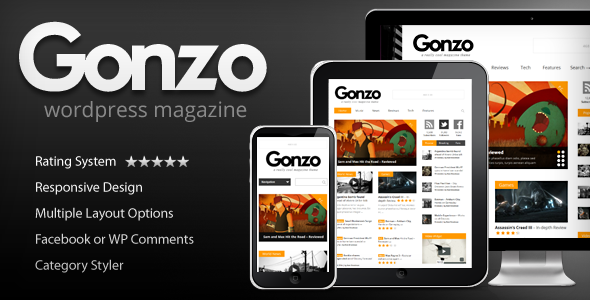
    The first thing I started with was fixing the design of my site. You can actually use the free themes that WordPress provides at the dashboard. However, like I indicated in my previous post, I am using the Gonzo theme from Themeforest.

    With the theme already installed, I went on and customized it to look good. I used the Gonzo theme since it looks professional. This professional look will be important in making visitors to convert on the site. I don’t want the site to look like another shoddy affiliate website.

    I want visitors to be comfortable being at the site simply from its design.

    If you have bought a premium WordPress theme, you will have to customize it depending on how it has been designed. The customization button will be on the left hand side menu or under “Appearance”.

    If you have not chosen a theme yet, you can check the variety available at Themeforest. Most good themes cost from $40 to $60. This is much cheaper than it would cost you to hire a designer to create a theme for you.

    Now, back to setting up the site.

    WordPress SEO Site Options

    1. The General Options

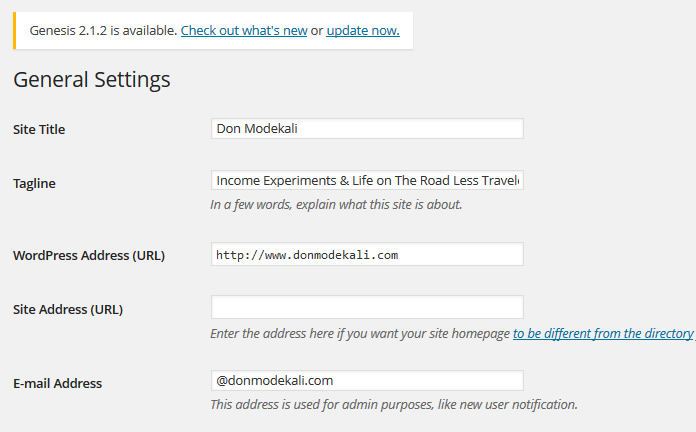
    To access the General Options, you will have to click the Settings menu on the left hand side. Here is a run-down of what I filled, and what you essentially should for your niche site:

    Site Title: Here, put the Title of your site. As you can see from the image below, the Title of my blog is Don Modekali, and that is what I filled. The title is basically the overall brand of the website. For the niche site, I filled product name reviews because that is the brand I want the site to rank for.

    general-settingsPS: Product name reviews means the actual name of the products that I hope to sell. Not the word “product”.

    Tag Line: Filling this section is not really mandatory. However, it’s good if you fill it since it can give first-time visitors a reason to stay. The Tag Line should be a short blurb about what your niche site is about.

    For instance, if you were selling iPhone cases, you may want something like “The Best iPhone Cases Online”.

    WordPress Address (URL): Put the URL of your niche site here. You can either choose to have your website referred as with the “www” or without the “www”.

    Now, you may be wondering with version to use. Before I explain further, I would like to explain the results of not specifying which version to use. Google Webmaster has a good explanation on the effects of using www or non-www for your domain.

    In simple words, Google bots see www and non-www domains as separate domains. Therefore, any authority meant for your website can be shared between the two URLs.

    Here is a good example.

    Some websites will link to your site as http://yournichesite.com

    Others will link to it as http://www.yournichesite.com

    (Notice the difference in the www and nonn-www versions)

    Now, any authority that the sites linking to your niche site are passing will be shared between the two URLs. To ensure you get maximum authority from any links from outside domains, you should specify to Google which is your preferred domain name.

    How do you do this?

    i)  Log into your Webmaster Tools account

    ii) Check the Gear icon and click “Settings”

    iii)  Next, indicate whether you want a www or non-www extension in the Preferred domain section

    After completing the above steps, you will need to use a 301 redirect to tell search engines which is your preferred domain name version.

    To create a 301 Redirect, log into your hosting account and find the .htaccess file. If you are not seeing the file, make sure you have set your cPanel to show hidden files.

    Open the .htaccess file with notepad and add the following lines of code depending on whether you want the www or non-www version.

     Force Use of WWW

    Paste the following code in the .htacess file

    # Start 301

    RewriteEngine on
    RewriteCond %{HTTP_HOST} ^yournichesite.com [NC]
    RewriteRule ^(.*)$ http://www. yournichesite.com/$1 [L,R=301,NC]

    #End 301

     Force Use of Non-WWW Domain

    Paste the following code in the .htacess file

    #Start 301

    RewriteEngine on
    RewriteCond %{HTTP_HOST} ^www.yournichesite.com [NC]
    RewriteRule ^(.*)$ http://yournichesite.com/$1 [L,R=301,NC]

    #End 301

    In the codes above, remember to change “yournichesite” to your niche site’s domain name.

    Question: Between WWW and NON WWW, which one is better?

    The answer is that there is really no version that is better than the other. If you have put the 301 redirect, visitors will be automatically sent to your website regardless of whether they put a www or not when typing your domain name.

    Now, let’s go on with other WordPress settings.

    Site Address (URL): This will only apply if you installed wordpress on a different folder from the default one. For instance, some people opt to install WordPress on their existing websites in a folder called “blog”. If this is the case, the URL to fill here would be http://www.yournichesite.com/blog

    However, if you installed WordPress on your main directory, leave this part blank.

    Email Address: This email is used for admin purposes. Set a separate email for this. Otherwise, you can get lost of user registration emails that can cloud your inbox if you use your primary email.

    New User Default Role: Leave all users to be subscribers.

    The next options are self explanatory and will not really have a major impact on the performance of your site. You can leave them in their default settings. The settings are for Time Zone, Date Format, Time Format, and Week Starts On.

    Writing Settings

    Leave everything in its default state.

    2. Reading Settings

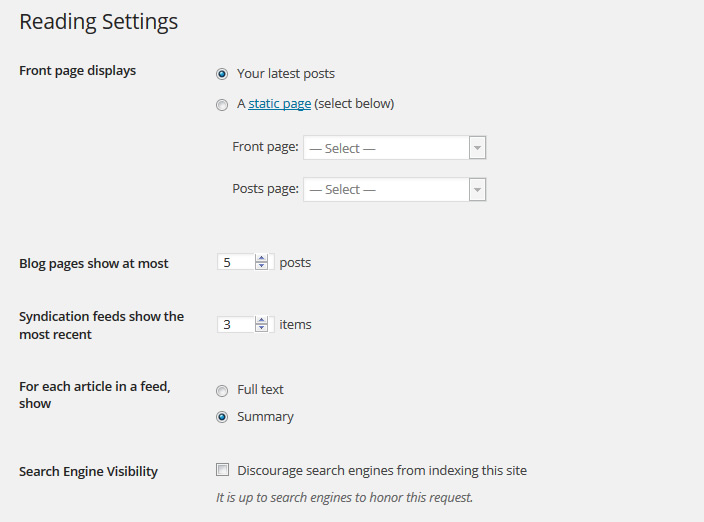
    reading-settingsHere is how I set up the reading settings for my niche site.

    Front Page Displays. Here, you have an option of setting the front page to display your recent posts or a particular page. For a niche site, I would recommend you set up the front page to display the main article you may have about the site.

    For instance, if you are selling iPhone cases, you may put the front page to display a comprehensive review of the top 10 iPhone cases in the market. This way, you give visitors a headstart on what to read that is likely to make them purchase.  Also, setting the front page to be a particular static page is likely to improve the pages ranking on search engines.

    So, for this option. I chose to set the front page to be a static page. My static page is a review of the top products in my niche. For the Posts options, choose the page that you have designated as your blog page.

    Blog posts to show at most. I set 5. You can set any number you feel like. But generally, try to keep the number under 10.

    Syndication feed shows the most recent. I chose 3. You can choose any number. Generally, 5 or less is better.

    For each article in a feed show. I chose “summary”,. You can set it to “full text” if you want. Your choice will not really affect the SEO of the site.

    Search engine visibility. Make sure the box is unchecked, unless you do not want your website being indexed by search engines.

    Follower settings. You can leave these as default or can customize them with your own message. I left mine in their default state.

    3. Discussion Settings

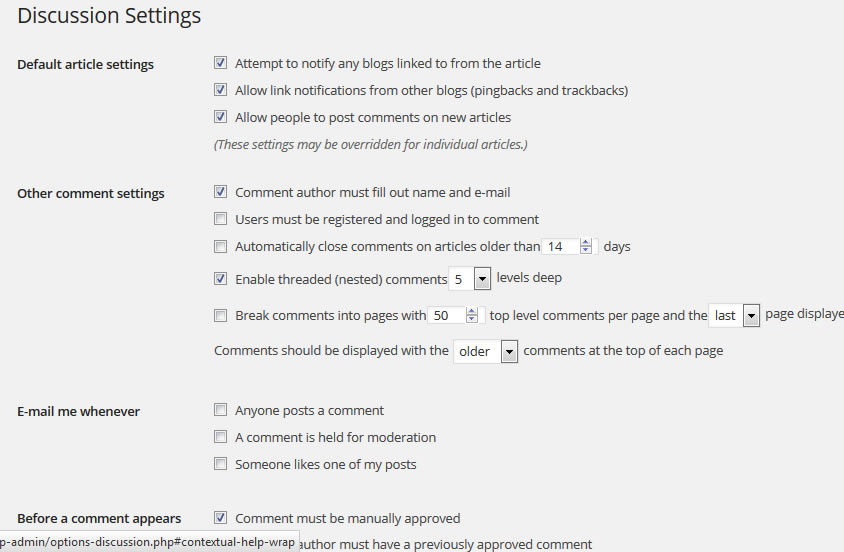
    This next section has a lot of options that you can customize to your liking. I will highlight the options that I think are important in setting up the niche site. Otherwise, the default settings will still work. Here is a screenshot of the Discussion Settings of this blog.

    discussion-settings

    Default Article Settings.

    I like to keep the three options here checked. Here’s why:

    i) Attempt to notify any blogs linked from the article. When i publish an article and I’ve linked to other people’s blogs, the blow owners will get a notification that I’ve linked to them. They may in turn come over to check my site and even link back to me in their next posts. This linking is beneficial both in terms of SEO and driving referral traffic.

    ii) Allow link notifications from other blogs (pingbacks and trackbacks). With this option checked, I will get notifications when other sites link to me. I can go over and check the sites and see what they are talking about with regards to my site.

    iii) Allow people to post comments on new articles. You can check this if you would like people to comment on your articles. I generally like checking it to encourage readers to leave comments.

    For the other setting, i.e. Other Comment Settings, Email Me Whenever, Before a Comment Appears, Comment Moderation and Comment Blacklist, you can leave them in their default settings or tweak them to suit your needs. The same also applies to the settings under Avatars.

    4. Media Settings

    Leave this section in its default state.

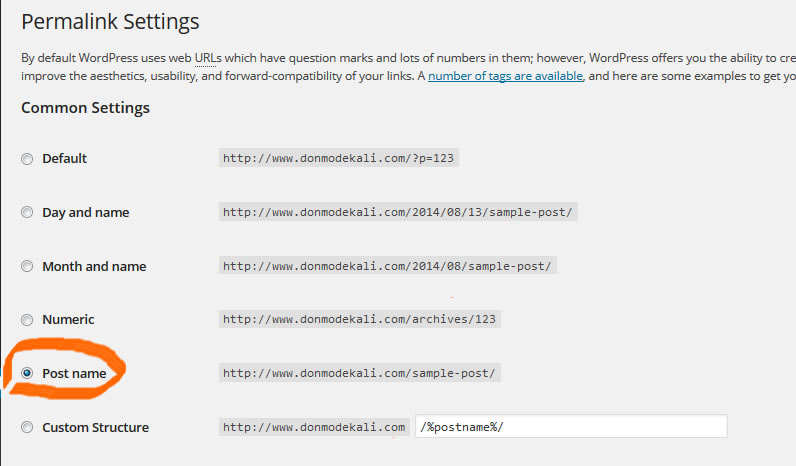
    5. Permalinks

    permalink-settings

    And this brings us to the end of the settings for our niche site. Hopefully, you have found value in this post. If you have any questions, please let me know in the comment section below.

    PS: Let’s connect on Facebook and Twitter!

    [mailerlite_form form_id=2]

  • NSD Episode 2: My Niche Site Content Strategy

    NSD Episode 2: My Niche Site Content Strategy

    content is kingHey guys, I hope March is good to you. It’s been a minute since I posted on this blog and today, I have an update on my Niche Site.

    Last time, we talked about finding a domain name and hosting services provider. If you  haven’t set up your website yet, you can do it in under 5 minutes by yourself using WordPress.

    —>Check  this guide on how to set up a WordPress site in under 5 minutes

    If you are just joining me, you can read the past  episodes of the Niche Site Study here:

    Now that we have our domain name and have, we have to think of content.

    My Niche Site Content Strategy

    Content fuels the web. It is what makes Google index  your website and bring visitors. The whole essence of searching things on Google is to get information. Thus, for my content strategy, I have to think of what information my niche will be looking for.

    When selecting my niche, I already had an idea of what people would be looking for.  And since we are looking to make money online, we want to solve a problem that people have. When researching my niche, I found out people  had a problem; they were looking for information on how to stop the problem they have.

    Apart from this, there are a number of products in the niche that  people are researching. They want to know if the products are good. So, they are essentially searching for reviews of the products.  For this niche, my content strategy will consist of the following:

    i)  Writing  educational articles on how to solve my niche’s problem. These articles will  be in form of  tips, lists, etc.

    ii) Writing reviews of the popular products in the market that can solve their problem. So, I would have lots of “product X review” or “product X guide” type of articles.

    Now, depending on your niche, you may want to explore other content avenues.  For me, my content will mostly be reviews of different products that the market can use as well as

    What Type of Content Will I Be Creating?

    Now,  creating articles is good as it helps  to get your website to rank high. However, when creating your content strategy, think about  which form of content will resonate well with the target market.   In some markets, having text content will work well. For  example, if you are selling an ebook to your market, you can only review the eBook  in in a series of articles or blog posts.

    On the other hand, if you are selling a physical product (for example, let’s say you are selling a coffee maker), you might want to  have a video of the coffee maker in action. This is apart from writing articles about it.

    You see,  different types of content will work for different types of markets.

    In my case, I will be writing articles on the “how to” advise. Apart from this, I will be creating videos  for the various physical products that the niche is looking for reviews on. In a nut shell, my content strategy consists of the following:

    i)   Articles- How to, tips, lists, etc.

    ii)  Videos/Slideshows of the products

    iii) Email course (This will basically be a series of emails talking about the problem and how it can be solved. It will also help me warm up prospects who are not ready to buy at that time)

    My niche is very specific and I think the above forms of content will work. Now, depending on your niche, you may wish to explore other content forms such as podcasts, eBooks, webinars, demos and so on. Check the image below for more.

    types of content

    Niche Site Content Message

    Every content you create should have an end goal. In any online business, you want to provide value to your market as much as possible. Providing value helps to establish you as an authority in your field. When your market can read  your articles and think “hmm, this guys really knows what he is talking about”, then they start ing you.

    Traditional and online businesses have very little differences save for the presence of a physical store and an online store. Apart from this, all the basics of business apply. Now, people buy from those that they trust.  Always remember that.

    Your content should make readers trust you. They should trust that you know the topic you are writing about and are genuinely interested in helping them.  Your content should be:

    i)  Educative

    You already know the problems that your niche market faces. Now, how can you solve this problem, at first without athin-content-googlesking them to buy from you?  This is where educational or advisory articles come in. Create articles that will give your audience tips on how to solve their problem.

    For example, if your niche is on freelance writing, you can provide tips on how to get your first client online. This advice does not have to be packaged into an eBook and sold given that it is already freely available online.

    TIP: Since Google Panda update, thin sites took a hit on their rankings. Therefore, you want to create more comprehensive content for your niche site. I recommend articles 500 or more words for your articles.

    After putting the last full stop on your article, ask yourself: will someone who will read this article be better off  that he was before reading the article? If your article has not provided value to your audience, you will have a difficult time getting your market to trust you.

    ii)   Informational

    Provide content that resonates well with your audience. People  go online to search for information and you want to be the guy providing the information they are searching about. Find out the information that your target market is searching about.

    Is your audience searching for reviews, guides, events, collections, etc.? Here, Google is your friend. Use Google Adwords tool to search for the keywords that your potential market types on Google when searching for  information.  If you want to drill your niche even further, I recommend you use Traffic Travis.

    Apart from Google, check on forums in your niche and check the discussions going on. Usually, you will find people asking questions about a problem they have or a product/service they are looking to get. Forums can be a good place to find ideas on what to write about. The good thing with forums is that since it comprises of  an audience that is interested in your niche, you can be sure that  of getting targeted visitors to your blog if you happen to cover a topic that seems popular in the forums.

    iii)  Entertaining

    Most people are online to get entertained. In as much as people have problems, they are also human and have  emotions.

    Creating entertaining content helps your audience to know that you are a real person behind the business and helps to break the ice than a new visitor may have.  When marketing to your market, you don’t always want to have this serious tone or voice on your content. Break the ice,  give your audience a good laugh.

    Business is built on relationships. And having some personality in your content helps to build a relationship with your target audience.

    There we have it, educate, inform and entertain. These are the three types of messages you should have on your content.

    This is the exact content strategy I will be following for my niche. Did I miss something in the content strategy? Let me know, I’d like to hear your comments.

    PS: Follow me on Twitter 🙂

    TOOLS MENTIONED IN THIS POST

    Traffic Travis – The No.1 Keyword research tool for finding profitable keywords in your niche.

    [mailerlite_form form_id=2]

  • Episode 1: Domain Name, Hosting and Website Theme

    Episode 1: Domain Name, Hosting and Website Theme

    choosing-domain-name-and-hostingWelcome to another update of my Niche Site Case Study. You can read the introduction post on the case study here.

    So, this week things were pretty quick. I did three things: bought a domain name, bought web hosting and bought a website template. Let’s go deeper into these actions;

    Buying the Domain Name

    The niche I am in is pretty targeted and is in the health category. I cannot reveal the niche at this stage because I want to avoid instances of skewed results that may arise by me revealing the niche. But I can tell you more about my target customers.

    My target audience has a problem and the solution to the problem is to buy a certain product. There are many brand names of the product available in the market. My approach is to build an authority website that reviews the different brand products and hopefully help customers make a good decision.

    In taking this niche, I know that:

    1. the target customers know they have a problem.
    2. the customers know there are different product solutions for their problem.
    3. the customers are looking for reviews of the different solutions before they buy.

    So, my major type of content I will be posting on the website will be in-depth review of the products.

    Since, I have already researched the marketing and the target keywords (more on the niche and keyword numbers in my next post), I decided to pick an exact match domain (EMD). The reason for this is that I believe I can rank faster for my target keywords with an EMD. Despite Google’s EMD update, I still see EMD sites ranking. I honestly believe Google does no tell the whole truth about rankings. I hope I’ll find out in this study.

    The domain name is registered for one year. I used NameCheap.com to register.  NameCheap usually sells .com domain names at $10.69 per year. But why I like them is that the company offers a lot of coupons for its services. Before registering the domain name, I headed off to NameCheapCoupons.com and grabbed the coupon “THX2U“. This allowed me to save $1.08 on my purchase. Thus, I was billed $9.79. In addition, I also got free Whois protection and Comodo SSL certificate valid for one year.

    That is all about buying the domain name.

    Choosing a Web Hosting Provider

    The next thing was to buy web hosting for the website. I am not new to web hosting so my choice was easy. There are a couple of things that I was looking in a hosting provider for the site.

    1.Bandwidth

    Since I am making an authority site, I expect it to have lots of visitors at one time or the other. Therefore, I needed a host that offers unlimited bandwidth. This will ensure that the site will always be accessible no matter how many visitors stop by it.

    2. Disk space

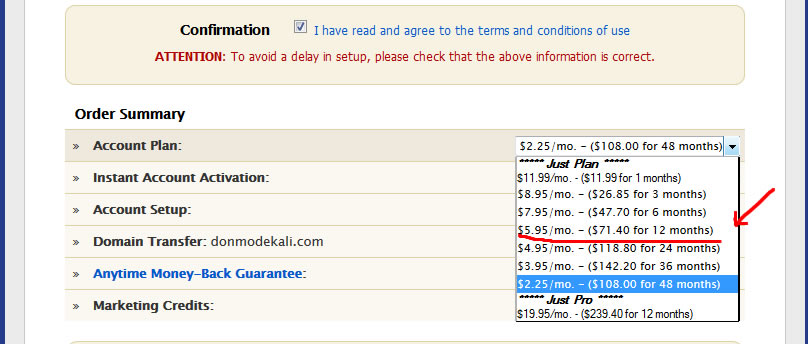
    I don’t see the site needing a lot of space so I could have chosen anything from 10GB and up. However, I found a great hosting company that offers unlimited hosting for a fair price. The company is JustHost and for just $5.96 per month ($71.40 for one year), you can enjoy unlimited disk space.

    3. Price

    Price is another thing I was looking for. Basically, I believe you can get good hosting at less than $10 per month. There are many websites that offer hosting at less than $10 per month. JustHost offers different pricing per month based on the term of the payment. I chose the $5.95 ($71.40) for one year.  Below is an image showing the other prices available and their duration:

    just-host-pricing

    4. Support

    As I mentioned, I have been hosting my different website and for my clients on Just Host since 2010. I have had good email and phone support from them. In some instances, the support team has helped me with problems that I or my clients caused on our websites. This is one of the things that makes me stick to Just Host up to today.

    The above are the four main things I was looking for in a hosting provider, and they are what made me choose Just Host over other popular hosts like BlueHost and HostGator.

    There are many web hosting reviews online that can guide you on the right web hosting company. Personally, I prefer JustHost. I have been with them for three years now and have found them to be affordable and offer awesome support.

    Choosing a Website Theme

    Creating a website is no longer a difficult thing thanks to WordPress. With WordPress, you can easily set up your blog within 5 minutes and be up and posting. If you don’t know how to set up a blog, I recommend you read this guide on how to install WordPress on your hosting account.

    Like you may have guessed, I chose to build my site using WordPress. I prefer WordPress because I’ve found it to be good when it comes to SEO than most Content Management Systems (CMS). But I just did not want to have the basic WordPress theme on the niche site. I wanted something that is professional and will build the site’s brand to the audience. This is the theme I chose (click here to view)

    gonzo-theme

    I searched for a theme on ThemeForest and finally settled on the Gonzo theme. ThemeForest, in my opinion, is the best place to find affordable themes. The site is one of the largest WP theme marketplaces on the Internet.  You can search for themes based on industry, most of which go for  under $50. The Gonzo theme cost me $45.  I will have to do some customizations for it to fit my needs later on.

    Niche Site Case Study Costs

    Here is a breakdown of the costs that I have incurred so far:

    Domain name registration from NameCheap ($9.71)

    Web Hosting for one year from Just Host ($71.40)

    WordPress theme from ThemeForest ($45)

    TOTAL COST:  $126.19

    In my next post, I will be discussing on how to set up the website. Stay tuned.

    RESOURCES MENTIONED IN THIS POST

    JustHost: The web hosting company I use ( Get unlimited disk space and bandwidth for $5.95 per month)

    NameCheap: Buy .com domain names for $10.69 per year. (Visit NameCheapCoupons.com to get a coupon before you buy.)

    ThemeForest: Browse hundreds of premium WordPress themes. Get a theme for under $50.

    PS: I’m on Twitter. Follow me @modekali

    [mailerlite_form form_id=2]
  • Niche Site Case Study: My Niche Revealed

    Niche Site Case Study: My Niche Revealed

    niche-site-revealedHey guys! I’d like to thank you for stopping by. Today, I am going to tell you what my niche is and what I considered when coming up with it.

    If you read my last blog post on 3 characteristics of a profitable niche, you already know some of the primary things I consider important in a niche. In a nutshell, I believe a profitable niche should:

    • Be big enough to make good money from it.
    • The target market should be able to afford what you want to offer.
    • The market should know they have a problem and should be looking for a solution to solve the problem.

    For this Niche Site Case study, I decided to target an evergreen market. For those who don’t know, an evergreen niche basically means a market segment whose desire or need for a solution is not affected by seasons or events during the year.

    For example, people look to lose weight any time of the year. Thus, the weight loss niche is an evergreen market.

    On the flipside, people only buy Halloween costumers in October before Halloween. Thus, the Halloween costume niche is not evergreen since it is dependent on an event (Halloween).

    How Did I Find My Niche?

    There are many ways in which you can find a profitable niche. More of this in a later blog post. But primarily, finding a niche is all about finding a problem that people have and a way of solving it in a better way.

    Any problem that is worth solving can be a niche. You just have to find how to solve the problem in a better way. And where do people share their problems or frustrations on the Internet? On social media and in forums.

    First, I’ve chosen an evergreen niche in the bigger “health” niche. My target audience is divided into two, although they are related.

    • The first audience is looking at stopping a habit naturally.
    • The second audience is looking for a product that can help them stop that same habit.

    So, I basically will be catering to two related audiences in the same sub niche in the health category.

    For the purpose of fairness and to prevent people with malicious intentions, I will not directly reveal the niche at this time. However, I hope to release the niche, the website domain name and everything else at the right time.

    I choose not to directly reveal the niche and site for two reasons:

    1. I don’t want the results of my case study to be affected by people already knowing what I am working on.
    2. I feel more comfortable working on the niche site at my own pace without pressure.

    However, this said, I will provide as much data as possible during my case study. For example, I will provide the keyword strategy I used, the search numbers, traffic numbers and so on. I intend to make this Niche CS one where any person can benefit through step by step tutorials.

    Validating My Niche Market

    After finding a problem that people had and were looking for solutions, I know I have a potentially lucrative niche. But first, I had to validate the niche market to see whether it has any potential in making GOOD money.

    If you have identified a potential niche, I encourage you to go further and validate it. Here is what validation involves:

    • Check the size of the market. Is it big enough to warrant you getting into it?
    • Determine the solution. Will you create a product or refer your customers to other products as an affiliate?
    • Competition. Are there competition sites in the niche? How strong are they in search engine rankings?
    • Content. Can you easily find content to write about in the niche?

    I’ve done all the above and I am convinced I have a good niche. In the coming blog post, I will show you how I validated the niche using the above four steps.

    Until then, keep grinding.

    Have something to say? Holla at me on Twitter @modekali. It will be an honor to connect with you.

    [mailerlite_form form_id=2]


  • Introducing My Niche Site Case Study

    Introducing My Niche Site Case Study

    niche site case studyI am starting a niche site case study this month. The aims of the case study are mainly two:

    • Create a high authority website in the niche.
    • Make a passive income from the niche

    In this blog, I will document my journey from the start and try as much as possible to let you know what I am doing, the tools I am using and possibly through in a couple of tutorials on different tools.

    Why a Niche Case Study Now?

    For the most part, I want to have a way to document my progress with the project. Many people have done niche case studies in the past and ended up with some impressive results. The first time I came across a niche case study was at Pat Flynn’s Blog Smart Passive Income. The study was done in 2010 and in 2013, he started another study Niche Site Duel (NSD2).

    A niche case study offers me a way to be more productive with my time and test my committments to my projects. I’ve had many projects in  the past all in the head. Do you know what happens with projects in the head? I’ll leave that to you. This time, I’ve decided to document my journey. This is the post introducing my niche site case study.

    Project Motivation: Keeping Myself in Check

    In my quest to keep myself in check and motivated to complete the project, I am doing the case study together with a couple of guys inspired by Glen from ViperChill.  The whole study is known as the Triple XXX Niche Case Study (read about it here) and although I am not officially in the case study, it’s good to have my own study on the side and see how I will do compared to Glen, Diggy and Mr. V of Triple XXX Niche Case Study.

    Niche Site Case Study Updates

    I will strive to post updates on the Niche Site Case Study at least once a week or two weeks. The posts will usually indicate the major things I have done on the website and the reason for doing so. If you are interested in daily updates of the study, you can check me the updates I make at Private Inc. Forum.

    Some of the things I expect to cover in my updates include:

    • Traffic generation methods I’ll be using
    • Crunching the numbers (site visits, Google rankings for various keywords, leads generated, etc.)
    • Costs of doing various tasks. (For most tasks, I’ll be doing things on my own. But if I have to outsource some tasks, I will indicate how much I will have spent).

    At the end of the project, I hope to me making some passive income (Perhaps, a 4HourWorkWeek model?).

    If you are also building a niche site and have a case study, comment with your link below and we can keep each other in check.

    PS: Want to say something? Tweet me @modekali

    [mailerlite_form form_id=2]